

Sales Report
Dashboard of Event Ticket Sales Report
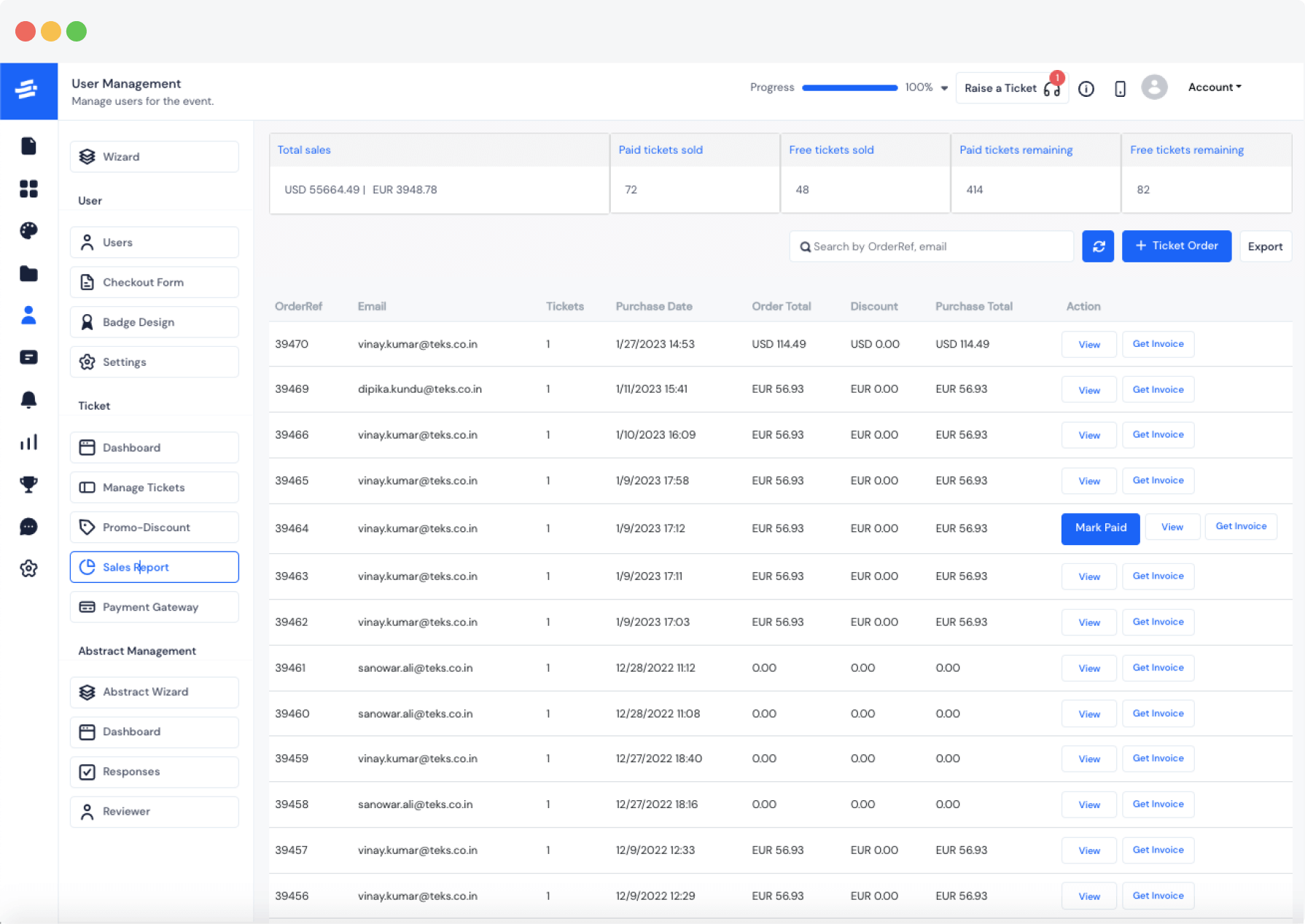
No more waiting for reports to come in. HOST is the most user-friendly event ticket sales tracker system on the market that allows you to see all your data, at a glance. Know what's going on with your sales and attendance anytime of the day, from anywhere.
Track & Export
Track & Export Your Online Event Ticket Sales
Easily see who's bought tickets and how many seats are left for all of your events. No need to spend hours on spreadsheets or reports. With HOST, you can quickly and easily manage your event ticket sales data with just a few clicks.

See Where You Stand: Save time and money by knowing which tickets are selling and which ones need more push. With automated ticket sales report on HOST, you can create actionable insights that will help you get ahead of your competition.
Manage Orders, Invoices, & Tickets: HOST makes it easy to see where you are in the game without any of the fussing around. Export Reports to CSV - If you need a spreadsheet of your event ticket sales, we've got you covered!
Frequently Asked Questions
What is a sales report in the context of an event platform?
In HOST ticket sales tracker feature, there is a dashboard that displays sales data for an event, such as the number of tickets sold, revenue generated, and ticket types purchased.
How can I access my event's sales report on HOST?
You can access your event's sales report by logging into your HOST account, navigating to User Management, and selecting the "Sales Report" tab.
What types of data are included in the sales report on HOST?
The sales report on HOST includes data such as total sales, ticket sales by type, revenue generated, and payment details.
Can I export my event's sales report from HOST?
You can export your event's sales report from the HOST ticket sales tracker in Excel or PDF format.
Can I track ticket sales in real time with HOST's sales report?
Yes, HOST's sales report updates in real-time, so you can track ticket sales as they occur.
How can I use the sales report to improve my event's marketing strategy?
You can use the sales report to identify which ticket types are selling well, which marketing channels drive the most sales, and which segments of your target audience are purchasing tickets.
Can I view sales data for individual attendees on HOST's sales report?
Yes, HOST's sales report displays sales data information on individual attendees.
How often is the sales report on HOST updated?
The sales report on HOST updates in real-time, so it is always up-to-date.
Can I set up automatic sales report emails on HOST?
You can set up automatic sales report emails on HOST to receive regular updates on your event's sales data.
Can I share my event's sales report with other team members?
Yes, you can share your event's sales report with other admin members of your team by granting them access to your HOST account or exporting the report and sending it to them directly.
Does HOST's sales report include data on refunds or cancellations?
Yes, HOST's sales report includes data on refunds, cancellations, and ticket sales.
How can I use the sales report to track my event's progress towards revenue goals?
You can use the sales report to track your event's progress towards revenue goals by comparing the total revenue generated to your target revenue.
Does HOST offer any support or guidance on interpreting and using the sales report effectively?
Yes, HOST's support team is available to guide how to interpret and use the sales report effectively and answer any other questions you may have.
Are there any currency restrictions on the event tickets sales report?
No, HOST offers the creation and purchase of event tickets in all currencies, and you can see the report as per purchase transactions.
Can I get an invoice for my sales report?
Yes, HOST offers an invoice with every ticket purchase.
Schedule a
personalized demo.
See how HOST can enhance the event experience for your attendees. Discover how mobile innovations are transforming events. Get a free demo tailored to your event objectives.

Features
Explore Our Most
Popular Features


Love the Smell Of Events Every Morning Like Us?
We're Totally Obsessed To Make Your Event Succeed!
Please Fill Out The Form To Request A Demo & Let us Convince You Why You Must Switch To HOST!
* PS: Nobody can match our pricing :-)
Please Fill Out The Form To Request A Demo & Let us Convince You Why You Must Switch To HOST!
* PS: Nobody can match our pricing :-)
Request a Demo
Tell us a bit about your event and our team will reach out to schedule your personalized demo.

