HOST Ups Your Ticketing Game: Introducing Advanced Ticket Settings!

March 30, 2025

HOST, the leader in event management solutions, is thrilled to announce the launch of Advanced Ticket Settings.

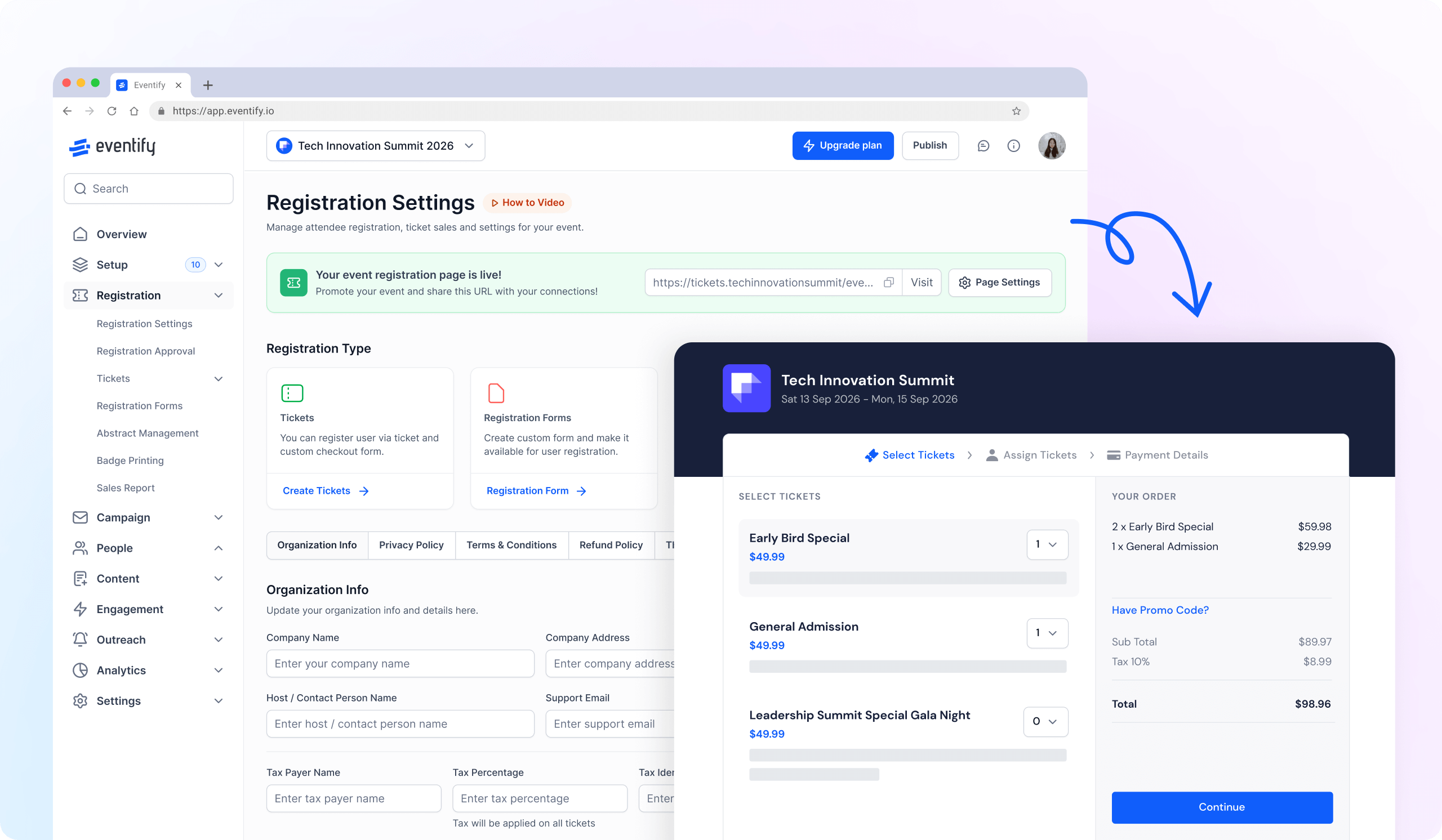
Advanced Ticket Settings provide organizers with the granular control they need to create a seamless ticketing experience for both themselves and their attendees.

Advanced Ticket Settings integrate seamlessly into HOST's existing ticketing system. Activating and configuring these features is a simple and intuitive process, allowing you to customize your ticketing experience in minutes.

Enhanced Ticketing Flexibility:

  1. Stay Informed: 
  • Activate Ticket Purchase Notification: If you enable this, you will receive instant email alerts whenever a ticket is purchased, allowing you to stay on top of sales and registration activity.
  1. Organized Groups:
  • Enable Tag-Based Ticket Group Setup: Switching it on will ask attendees to select a ticket group first. This will then display only the relevant tickets within that group, simplifying the user experience and reducing confusion.
  1. Streamlined Assigning:
  • When to Assign Attendee Ticket: This empowers you to determine when attendee ticket assignment occurs – either before or after payment. This flexibility allows you to customize the registration flow based on your event requirements.
  1. Free Yet Accountable:
  • Generate Invoice for Free Tickets: Enabling this allows you to generate invoices even for complimentary tickets. This provides a clear record of all registrations, maintaining transparency and facilitating financial reconciliation.
  1. Seamless Transfers: 
  • Order Ticket Reassign: Allowing this grants attendees the option to reassign their purchased tickets to another person. This feature fosters increased flexibility and attendee satisfaction.

See how HOST can help you organize a successful event! 

Request a Demo

Love the Smell Of Events Every Morning Like Us?

We're Totally Obsessed To Make Your Event Succeed!

Please Fill Out The Form To Request A Demo & Let us Convince You Why You Must Switch To HOST!
* PS: Nobody can match our pricing :-)
Features

Explore Our Most
Popular Features

Icon representing add or new item button
Learn more
Ticket icon representing event ticketing

Registration & Ticketing

Sell tickets online & manage user registration
Icon representing add or new item button
Learn more
Speech bubble icon representing messaging feature

Chat & Meetings

1-1 messagings and meeting to increase attendee engagement
Icon representing add or new item button
Learn more
Calendar icon representing event schedule

Schedule

Event tracks & sessions as per date and time in one place
Icon representing add or new item button
Learn more
User icon representing registration feature

Matchmaking

All-in-one B2B matchmaking for your attendees
Icon representing add or new item button
Learn more
Share icon representing social sharing feature

Social Feed

Private social network feed for your event
Icon representing add or new item button
Learn more
Multiple people icon representing community section

Community Forum

Forum or group messaging on predefined topics
Icon representing add or new item button
Learn more
Bar chart icon representing analytics dashboard

Poll & Live Q&A

Create interactive polls and QnA on live sessions
Icon representing add or new item button
Learn more
Microphone icon representing speakers feature

Speaker Profile

Speaker’s detailed information for sessions
Icon representing add or new item button
Learn more
Newspaper icon representing news section

Event News

A news section for event related news & announcements
Icon representing add or new item button
Learn more
Info icon representing event guide section

Event Guide

Create your own event help and support guidebook
Icon representing add or new item button
Learn more
Image icon representing photo gallery

Gallery

Event photos gallery by host or attendees
Icon representing add or new item button
Learn more
Storefront icon representing exhibitor booths

Product Showcase

Comprehensive exhibitor and sponsor page
Icon representing add or new item button
Learn more
Crown icon representing sponsors section

Sponsored Ads

Built in ads to promote sponsors & exhibitors
Icon representing add or new item button
Learn more
Checkmark icon representing survey feedback

Lead Scanning

All in one scan and export leads/contacts
Icon representing add or new item button
Learn more
Map icon representing interactive venue maps

Interactive Maps

Tappable interactive booth and floor maps
Icon representing add or new item button
Learn more
Bell icon representing outreach notifications

Push Notification

Send instant push notifications to attendee app
Icon representing add or new item button
Learn more
Trophy icon representing gamification features

Custom Branding

Customize & design your very own branded event app within minutes
Icon representing add or new item button
Learn more
Calendar icon representing event schedule

Session Rating

Get session rating and feedback from attendees
Icon representing add or new item button
Learn more
Bar chart icon representing poll or voting features

Survey

Build your own surveys to get feedback about the event
Icon representing add or new item button
Learn more
Bell icon representing outreach notifications

Email Notifications

Send instant email notifications to your attendees
Icon representing add or new item button
Learn more
Newspaper icon representing news section

Dynamic Form Builder

Drag & drop from builder for checkout form, survey & profile
Icon representing add or new item button
Learn more
Calendar icon representing event schedule

Schedule

Event tracks & sessions as per date and time in one place
Icon representing add or new item button
Learn more
Info icon representing event guide section

Event Guide

Create your own event help and support guidebook
Icon representing add or new item button
Learn more
Checkmark icon representing survey feedback

Email Designer

Drag and Drop custom email template designer
Icon representing add or new item button
Learn more
Bar chart icon representing analytics dashboard

Analytics Dashboard

Get real-time insights on your event on multiple fronts
Icon representing add or new item button
Learn more
Multiple people icon representing community section

Community Forum

Forum or group messaging on predefined topics
Icon representing add or new item button
Learn more
Speech bubble icon representing messaging feature

Chat & Meetings

1-1 messagings and meeting to increase attendee engagement
Icon representing add or new item button
Learn more
Ticket icon representing event ticketing

Registration & Ticketing

Sell tickets online & manage user registration